 HSL Mobile App
 Trading Portfolio Guide Holdings Reconciliation and Reports

This guide helps you understand how your holdings, transactions, and portfolio reports are maintained and updated across HDFC Securities platform.
Following are some key features of portfolio
- All the corporate actions are updated automatically by the system, so you won't have to add the stock splits, dividends, bonuses etc. manually.
- The IPO allotted to you towards the once applied from the web trading portal or mobile app or through the RM / call and trade desk will automatically reflect in your portfolio.
- IPO allotment towards the bid placed through HDFC Banks net banking site started getting updated in the portfolio with effect from 25th May'26.
- You can extract the detailed portfolio summary report to analyze your investment in all the asset classes.
- You can Maintains the portfolio across different asset classes.
- The following transaction are not auto captured in the portfolio and hence needs to be added manually.
- IPO allotted towards the bid placed through Banks net banking site prior to 25th May'26.
- Primary market bonds and NCD allotment
- ESOP allotment
- Holdings Transferred from other demat account.
- Holdings transferred out to other account
- Share received towards right issue
- Third partly Pledge invocation
- Share given in buyback offer prior to Jul-2017 (BSE) and Nov-2018 (NSE)
- Shares added through offer for sale prior to Aug-2015
Know the basis terms / values shown in the portfolio
- Invested Value: Reflects your cumulative investment till date on the portfolio across asset class.
- Current Value: Reflects the current valuation of your overall investment basis Current market price (CMP)
- Today’s P&L: Day's profit and loss is calculated basis on previous days net worth (Portfolio Quantity * previous day’s closing price) and current days net worth (Portfolio Quantity * CMP)
- Total P&L: Unrealized Profit or loss on the portfolio across asset class.
- Realized P&L: This is a realized P&L towards the partially closed and all sold holding. Todays booked P&L is not included.
- Portfolio Analysis: Get details on your portfolio top gainers /losers, intraday movement, portfolio overview from this section
Average Price Calculation
Average acquisition cost
Average Price = Total Cost of Shares Bought ÷ Total Quantity of Shares Held
Total invested value including charges
Total Cost = Sum of (Quantity × Buy Price including charges)
Net quantity held
Total Quantity = Total Shares Bought − Total Shares Sold
Time line for portfolio updation
All Trade transaction in equity, mutual funds, bonds and NCD’s done on a trade date gets updated in the portfolio before start of next trading day. Corporate actions impact gets updated in the portfolio basis the announced Record date.
- If you sell shares: The first in first out logic is used where the Sell transactions are knocked off against oldest buy position. Post which average price shown will be based on the balance quantity and its cost price.
- If you buy and sell on the same day: Qty bought and sold on the same day will be accounted as speculative trading irrespective of the product (intraday, cash, MTF). In this case FIFO shall not apply and hence there shall be no change in average price of previously held shares if any.
- Corporate actions may also affect AVG:
All trade transaction entries are captured in the portfolio. Subsequent corporate action entries are also auto captured in the portfolio. Certain corporate action entries may impact the average price. Few example are as follows.
- Bonus shares → quantity increased with no additional cost -> this lowers avg price
- Stock split → quantity increased with no additional cost --> his lowers avg price
- Demerger → the original cost gets divided between the parent company and the resulting company --> recalculates avg price
- Dividend → does not affect avg price
Realized Profit and loss
Realized P&L is the actual profit or loss you locked in. First in first out logic is used to calculated realized P&L irrespective of the product in which the transaction is undertaken (cash, MTF). However same day buy and sell trade are not considered in FIFO.
Corporate actions may affect realized P&L calculation like.
- Dividend earned adds up to realized gains.
- Demergers leads to cost split and may hence change the realized gain.
Common Reasons for Portfolio Mismatch
Script's quantity are less in portfolio and more in DEMAT, why?
This case can happen for the following reasons:
- You received ESOPs or you might have bought the script from somewhere apart from HDFC securities.
- There might be corporate action in the script before 01-Jan-2005, which our system has not incorporated. Any corporate action happened before 2005 you'll have to manually add to rectify the mismatch.
- Transactions done by the customer outside HSL.
- Rights issue allotted to the customer needs to be manually added in the portfolio.
- IPO allotment towards the once applied prior to 10-Feb-2010 and the once applied through bank portal prior to 25-May-26 are not auto updated in the portfolio. This has to be added manually.
- Unlisted shares are required to be manually added in the portfolio.
Script's quantity is more in portfolio and less in DEMAT, why?
This case can happen for the following reasons:
- If you have sold the scripts from somewhere apart from HDFC securities or transferred the shared to some other demat account, then this discrepancy would arise. To rectify it you'll have to manually add the sell entry that you have done from outside.
- In case of Buy transactions, the Demat qty gets credited on T+1 day whereas the Portfolio gets synchronized on T day EOD.
- In case of customer trading in E-Margin product who have not yet opted to convert their position to delivery.
- Customer who have pledged their shares will not be considered for Demat reconciliation.
For actual holding details, customer has to refer his / her demat balance.
Understanding Portfolio handling for different type of transactions
Rights entitlement (RE) : RE gets updated in the portfolio as per the ex date and ratio announced in the corporate action. If the customer do not renounce the share RE extinguishment entry is also passed in the portfolio as per the end date / even in case where client applies for the rights shares, portfolio will record extinguishment only. Customer have to manually update the portfolio for shares received through Right issue.
Dividend: From April 2021 onwards dividend entries are captured in the portfolio on Pretax basis. That is without showing any tax deduction in the dividend amount.
Demerger: New shares of resultant company is add to the portfolio on the ex-date. The ratio and valuation is also divided as per the cost ratio. Actual purchase valuation of the original company before demerger is considered to derive the valuation of shares of demerged and resultant company post demerger based on the cost acquisition ratio. Currently, while the portfolio records the demerger transaction as a separate entry based on the ex-date. While calculating the profit and loss (P&L) on the sale of shares, the acquisition date for the demerged (resultant) company is considered to be the original purchase date of the parent company
New Fund offer (NFO) : NFO application is done on amount basis. Post-application, the allotment of units is determined according to the price set by the company, and the units are subsequently allotted and credited to the linked demat account. The portfolio used auto-captures the NFO entry based on the bid amount and the default face value of Rs. 10/-, capturing the number of units allotted. However, there is an option provided to edit the entry based on the actual allotment received. We advise investors to check the credit of the units received through their demat balance and accordingly edit the NFO entry processed by the system. This will not be found in resent NFO allotments. Currently NFO are recorded in the portfolio as per the actual allotment Qty and price
IDCW fund (Dividend reinvestment fund) : In Dividend reinvestment plan the AMC reinvest their cash dividends into the Mutual fund and accordingly additional units of the underlying MF are credited to the customer on the dividend payment date. Currently such entries are auto updated in the portfolio based on balance unit showing in the portfolio on the ex-date and the NAV of the unit as on the Ex-date.
- Balance unit on ex-date * dividend announced / NAV
The TDS effect on dividend is not considered in the current portfolio module. However, the dividend reinvestment done by the AMC is after considering TDS on dividend. This Leads to the difference in the actual reinvestment amount (which is post TDS) and the reinvestment amount considered in the portfolio (without TDS). Hence in such instance Clients may find difference in the no’s for unit received as dividend reinvestment between the demat balance and portfolio.
Demat balance is the actual balance of your holding. Clients may check the demat transaction statement to check the actual units received through dividend reinvestment.
Process for adding manual transaction in the portfolio for reconciliation:
- You can use the demat reconciliation option to identify the scrip which has quantity mismatch between the portfolio and demat balance
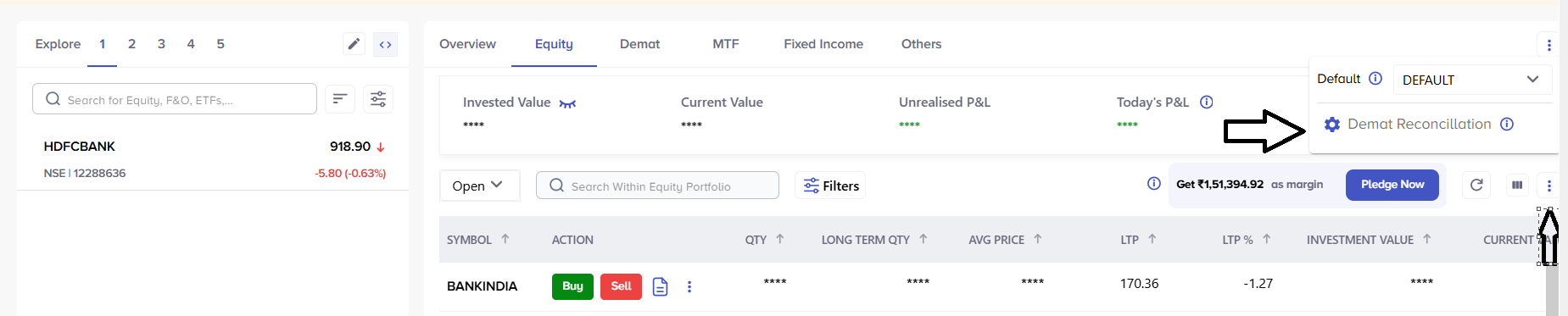
- The stocks balance in demat and portfolio will be seen bifurcated in 3 section
|
Scenario |
Meaning |
Action Required |
|
Demat = Portfolio |
Holdings matched |
No action required |
|
Demat > Portfolio |
Shares missing in portfolio |
Add buy transaction |
|
Portfolio > Demat |
Extra shares in portfolio |
Add sell transaction |
Manual transaction option
You may also use the delete button to delete any unwanted manual transaction that you have added in the portfolio
You can verify the list of all Manual entries from the Manual transaction option on the portfolio à Equity screen . The option to edit and delete Manual entries is available on this web page
Manual entries added will be displayed in IR Mobile and Web on T+1 day.

Holding summary and Negative holding
You can view the scrip wise transaction history from the holding summary option provided besides each scrip in the portfolio.
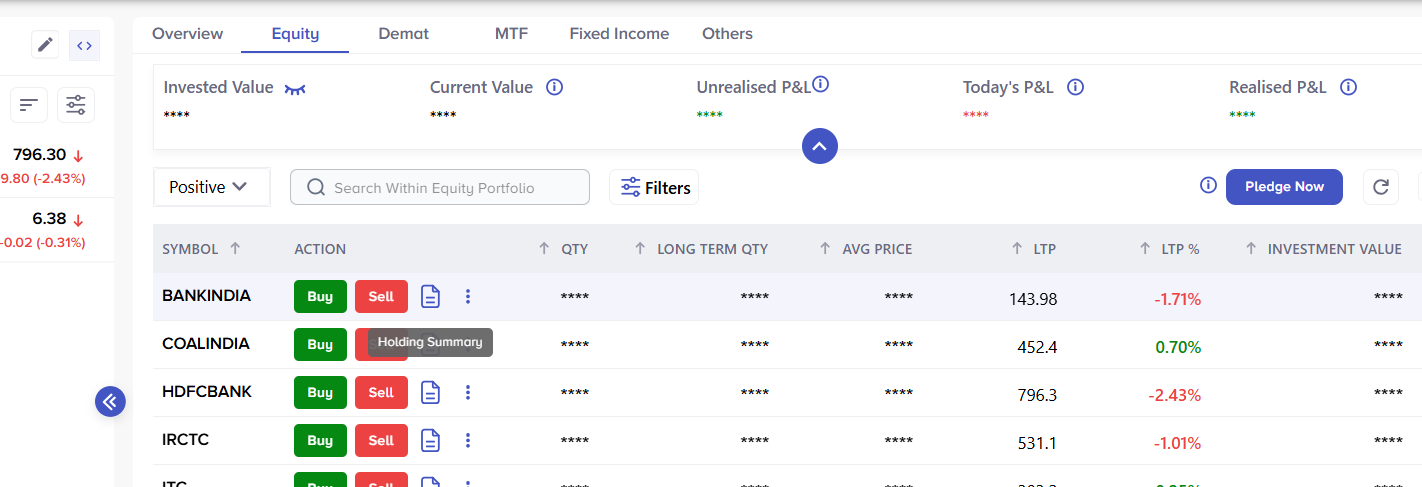
You can also filer the portfolio basis the holding type i.e. Positive, Closed and Negative.
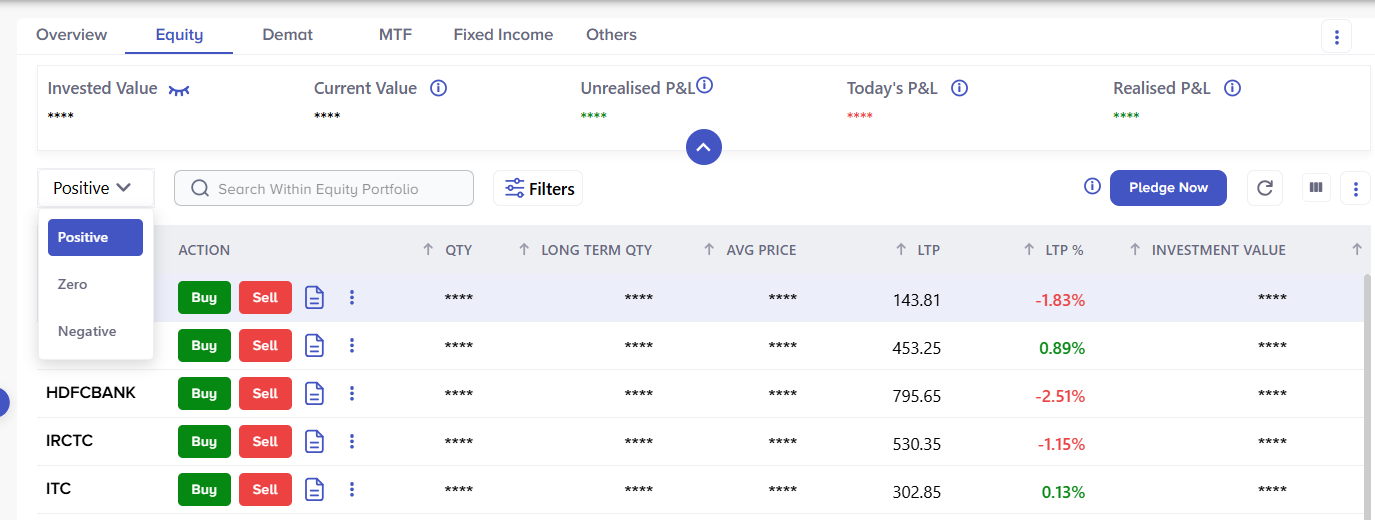
Negative holding refers to scrips that are sold from the trading account and so the portfolio has captured selling transaction entry, but there is no corresponding buy entry captured in the portfolio. This can happen when you sell the shares which are not acquired through the trading account or not auto captured in the portfolio. Like the ESOP, transferred shares, Right issue etc
You have an option to view the negative holding, open the holding summary and add manual buy entries in the portfolio to get it reconciled.
Please be informed that the Profit and loss and Capital gain report available on the portal is generated on the basis of transaction entries captured in the portfolio module. Hence it is important to get such portfolio entries reconciled to ensure that statements extracted from the portal shows accurate details.
Trading Reports
We would like to inform you that you can view and download your Trading account Statements from your secured login at https://investright.hdfcsec.com.
Find the option "Reports" under Profile Icon ( Top Right Corner)
Under this section, you will find the following statement
- Capital Gain / Loss Statement
- Profit & Loss Statement
- Client Ledger
- Equity Trade Details
- Equity Derivative Trade Details
- Commodity Trade Details
- Mutual Fund Order Details
- Contract Notes
- Interest Charged Report
- HDFC Securities Demat Holding statement
Statements are currently available for download in Excel format .
For HDFC Bank Demat accounts Transaction, Holding Statement, or Client Master List, you may write to HDFC Bank Depository Services team at [email protected]
Related Posts
Don't miss another Article
Subscribe to our blog for free and get regular updates right into your inbox.
Categories




Subscribe for our
newsletter
newsletter
