 HSL Mobile App
 Introducing Our Revamped MTF Journey: Enhanced Features for a Better Trading Experience
Introducing Our Revamped MTF Journey: Enhanced Features for a Better Trading Experience
We’re excited to announce the revamped Margin Trading Facility (MTF) journey in our mobile application! This upgrade is designed to equip you with essential tools and features to elevate your trading experience. Let’s explore the new enhancements tailored for your needs.
What is Margin Trading Funding?
Margin Trading Facility (MTF) enables investors to buy stocks by paying only the minimum margin & the rest is funded by the broker (HSL).
MTF is an exchange-approved product in which individuals can purchase stocks by paying only the initial margin, with HDFC Sky funding the remaining amount. Investors have the option of accepting delivery of the stock or holding the position open for as long as they like.
New Features in the MTF Journey
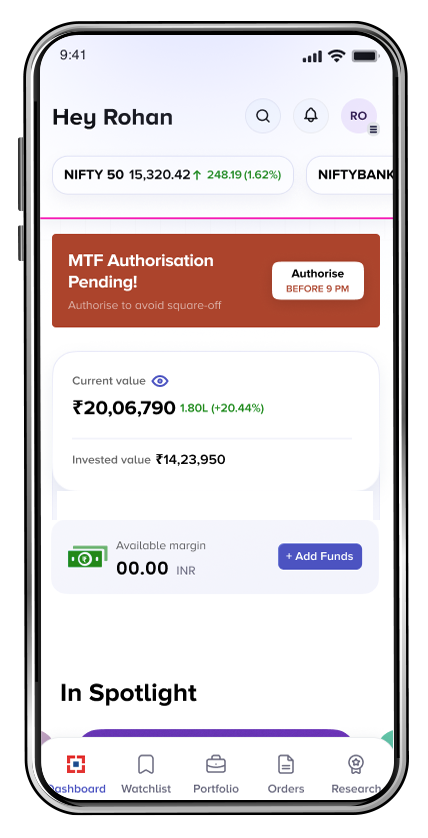
1. Authorization Pending Alerts
An important step after taking MTF position is completing the Pledge Request. This is a mandatory process introduced by SEBI. You’ll receive in-app notifications when authorization is pending, helping you manage your trades effectively.
Users will now see alerts on their dashboard for any pending authorizations on margin trading funding (MTF) positions. If you haven’t authorized your MTF positions, a prominent banner will remind you to complete this step. By clicking on the banner, you will be seamlessly redirected to NSDL/CDSL website to finish the authorization process.
2. Square Off Alerts
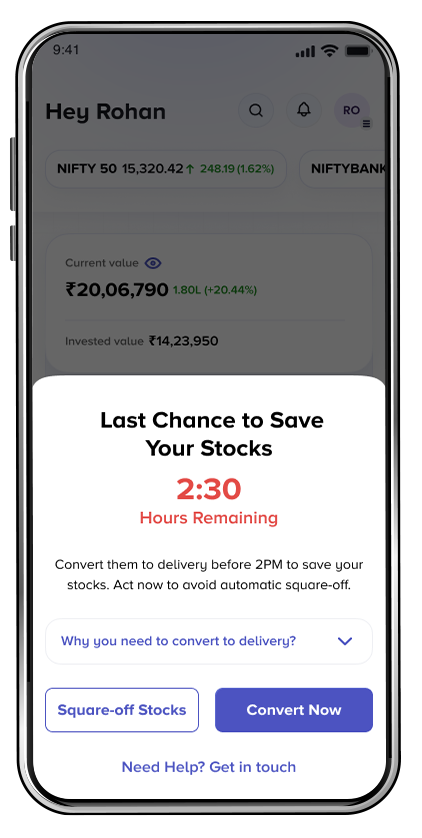
We’ve implemented a robust alert system within our app that notifies you when you Margin Trading Funding position are at risk. If a position is at risk of being squared off due to pledge request not accepted or reaching the T+275day limit, you’ll receive timely alert to perform Convert to Delivery for such positions.
3. Dedicated MTF Dashboard
In addition to above we’ve introduced a dedicated MTF dashboard. This page provides easy access to vital information and tools to enhance your trading experience.
- A. MTF Trading Limits: This section allows users to check the available trading limits for MTF activities. By understanding their limits, traders can make informed decisions and utilize their available trading capacity effectively.
- Available Limits: The limit available for trading in MTF, helping you gauge your buying power.
- Utilized Limits: The limit you have already utilized for taking MTF positions, giving insight into your current exposure.
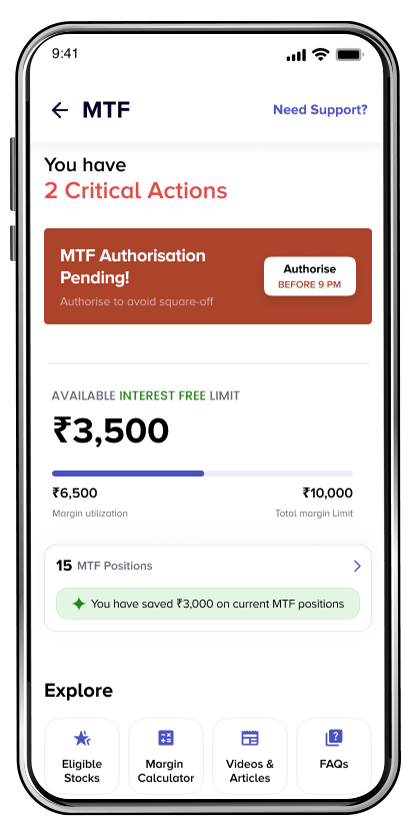
B. Count of Open MTF Positions: View the count of your open MTF positions at a glance. By clicking on this count, you can navigate to a dedicated MTF positions page, where you can get detailed insights about each position.
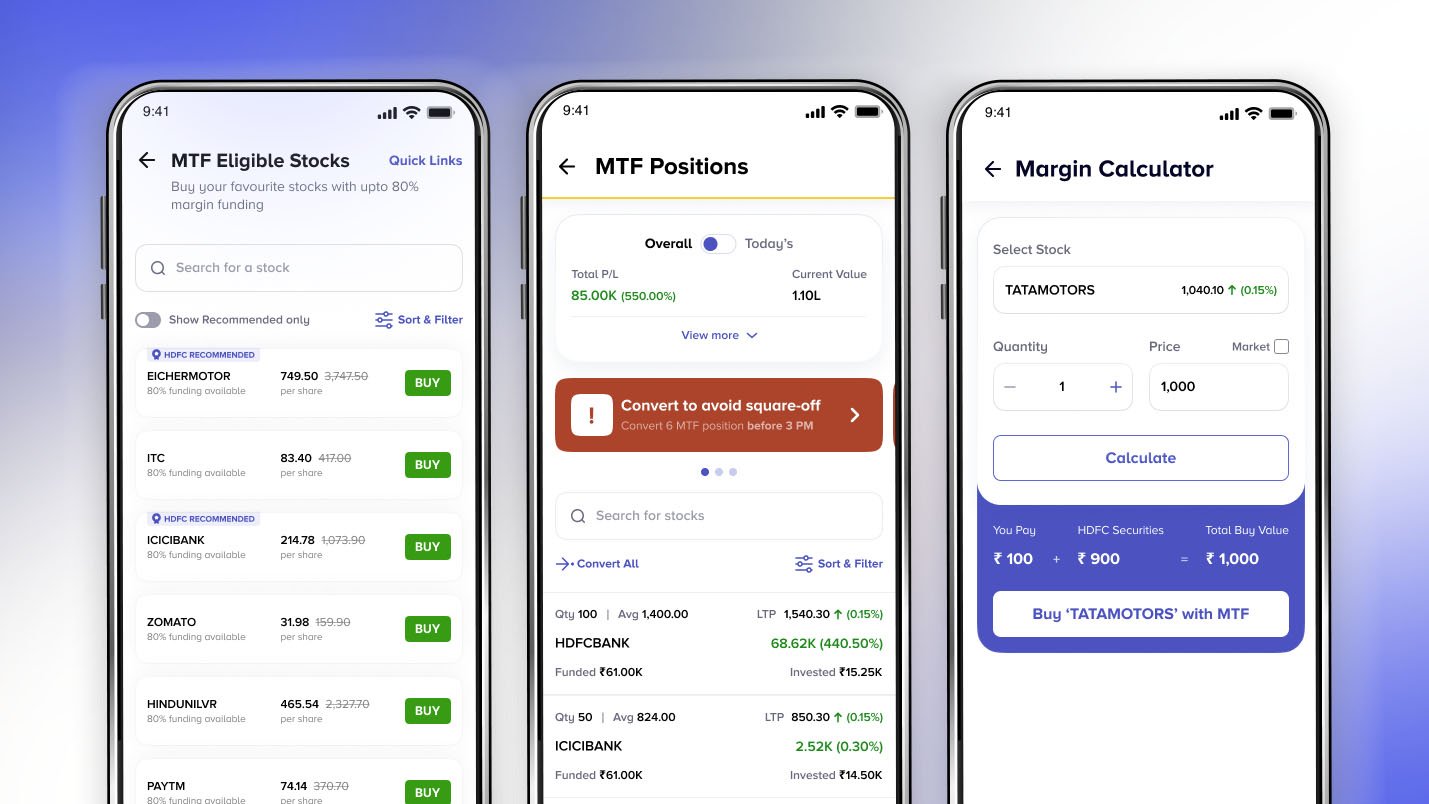
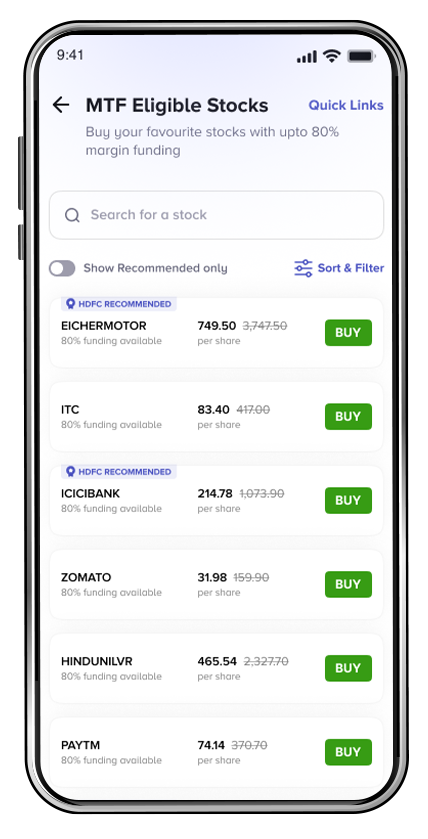
C. MTF Stock Eligible List: Access our comprehensive list of MTF- eligible stocks from the dedicated MTF dashboard page. This feature displays all stocks eligible for margin trading, along with detailed information on the stock level funding percentage provided by the HSL. This transparency helps user make informed decisions.
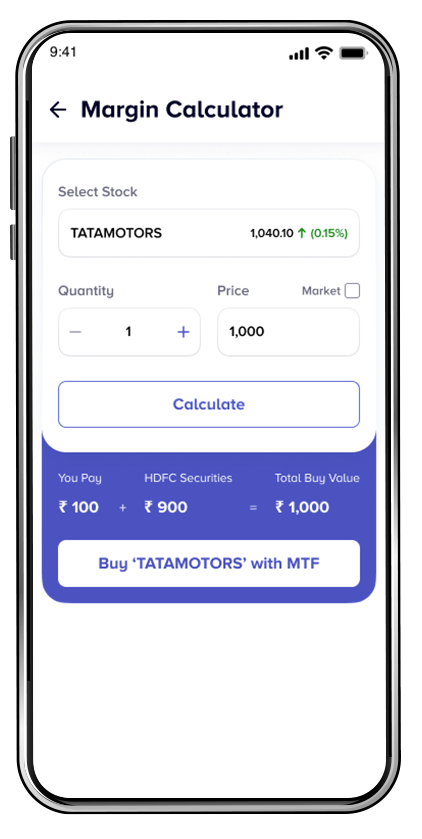
D. MTF Margin Calculator
How it Works:
- Select Your Scrip: Start by choosing the scrip you wish to trade.
- Enter Quantity and Price: Input the quantity and price of your desired order.
- Calculate: With a simple click of the ‘Calculate’ button, you’ll receive essential margin information.
Key Information Provided:
- You Pay: This amount represents what you need to pay upfront.
- HDFC Securities Funding: This indicates the portion of the investment that will be funded by us, your broker.
- Total Buy Value: The sum of the amount you pay and the funding provided, giving you a clear picture of the total cost of your trade.
Why This Matters
The Margin Calculator not only simplifies your trading process but also enhances transparency. By clearly outlining your financial responsibilities and the funding from HDFC Securities, you can make quicker, more informed trading decisions.
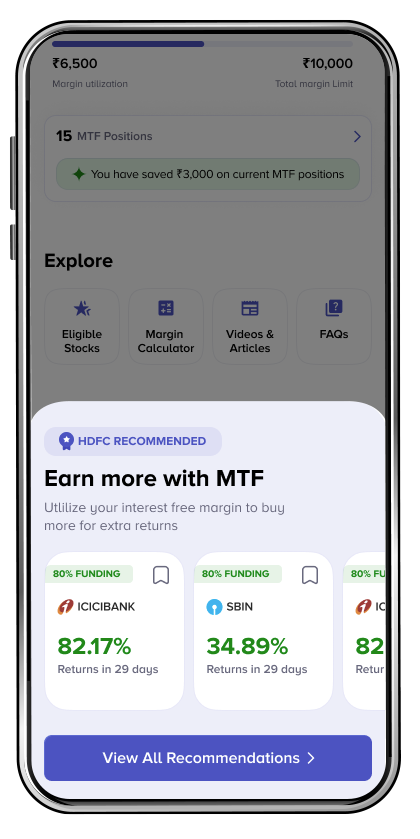
E. MTF Research Recommendations:
Access a curated list of MTF stocks recommended by HDFC Securities. Each recommendation includes:
- Scrip Name: The name of the stock.
- Potential Returns Percentage: An estimated percentage of potential returns.
- Duration: The expected duration for achieving these returns.
For more details, users can tap on a particular record to access additional insights and analysis related to that stock.
4. Dedicated MTF Position Page
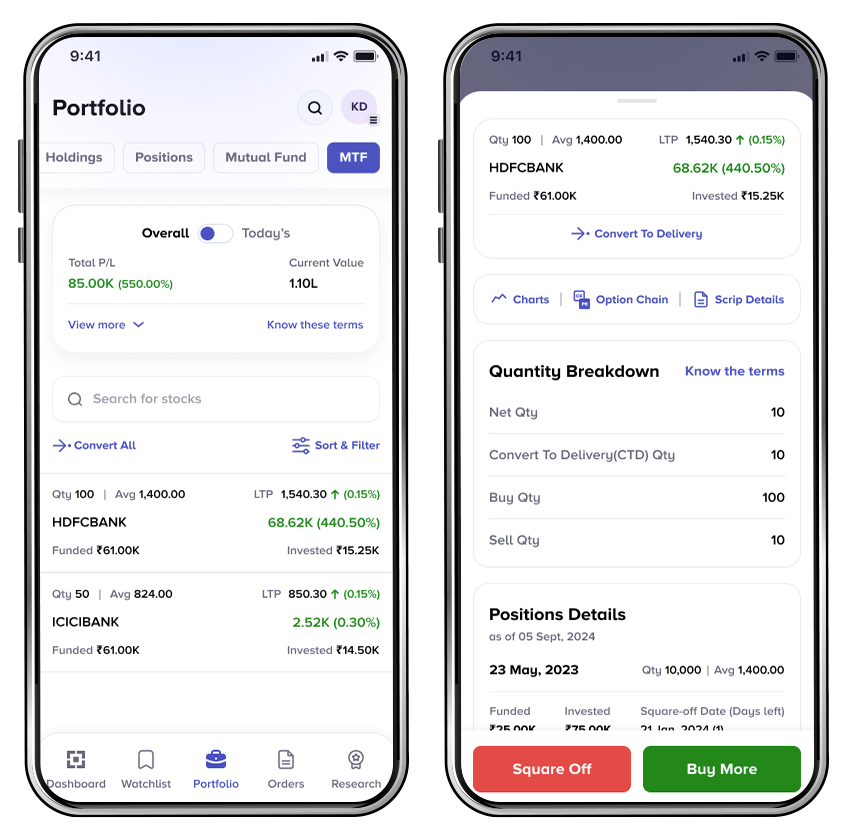
Monitor your MTF positions with ease on our dedicated MTF position page. This user-friendly interface allows you to view all your MTF trades in one place, making it simple to track performance and manage your portfolio.
MTF position page has following information.
- Overall Gain/Loss: You can check overall gain/loss on open MTF positions.
- Today’s Gain/Loss: You can check today’s gain/loss on open MTF positions. This is calculated basis previous day’s closing price.
- Invested Amount: This is the amount which you had paid as margin on the open MTF positions.
- Est. Funded: This is the Estimated Funded amount on the open MTF positions.
- Position Breakup: Multiple MTF position taken on different dates in single scrip can be tracked here.
- Square Off Date: This is the date on which your MTF position will squared off i.e completion of T+275 days
- No of Days Left: You can also check no days left to complete T+275 days.
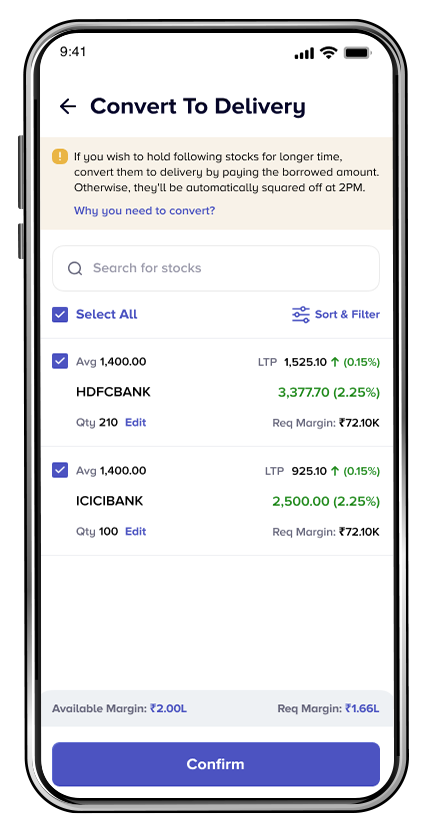
5. Convert to Delivery for Multiple Positions
Managing multiple positions can be cumbersome, but our new "Convert to Delivery" (CTD) for multiple MTF positions feature simplifies the process:
- Flexibility: You can select multiple positions to convert at once, streamlining your workflow.
- Efficiency: No more tedious individual conversions—handle your positions in bulk to save time and effort.
Benefits of the Revamped MTF Journey
- Proactive Management: Authorization and convert to delivery alerts help you stay ahead, minimizing the risk of unexpected position closures.
- Enhanced Flexibility: The ability to convert multiple stocks to delivery simplifies the process of managing your holdings.
- Increased Transparency: The eligibility list, margin calculator, and dedicated position page provide clarity and control over your trading activities.
- User-Friendly Experience: These features create a more intuitive trading environment, making it easier for all users to navigate MTF trading.
Related Posts
Don't miss another Article
Subscribe to our blog for free and get regular updates right into your inbox.
Categories




Subscribe for our
newsletter
newsletter
