 HSL Mobile App
 Trade Bigger, Smarter, Faster : Introducing the Auto Order Slicer

Trading in the Futures and Options (F&O) segment often requires precision, speed, and seamless execution. However, traders frequently face a significant roadblock when placing large orders: the freeze quantity limit imposed by exchanges. This limit restricts the maximum number of units that can be placed in a single order. For traders wanting to execute larger trades, this means breaking down the order into multiple smaller ones, resulting in inefficiency and potential price slippage.
The Order Slicer feature in the InvestRight is a game-changing solution designed to streamline the process and enhance your trading experience. Let’s understand it in detail !
What Is the Freeze Quantity Limit?
The freeze quantity limit is a maximum cap set by exchanges on the number of contracts that can be executed in a single order. This is primarily a regulatory measure to ensure market stability. While it is effective in maintaining control, it can pose challenges for traders dealing with larger quantities.
For instance, if the freeze limit for Nifty option contract is 1,800 and you want to place an order for 18,000 quantity, you would need to manually split your order into at least 10 separate orders. This process is not only time-consuming but also increases the risk of price slippage, as market conditions may change between your manual entries.
How Does the Order Slicer Help?
The Order Slicer feature in the InvestRight removes this hassle by automating the process of splitting large orders while keeping the user experience smooth and intuitive. Here’s how it works:
1. Automatic Order Slicing
When you input a quantity larger than the freeze limit, the system automatically slices your order into multiple smaller orders based on the exchange’s limit. For example, if the freeze quantity is 1,800 and your total order is for 18000, the system will split it into 10 orders of 1,800 each.
2. Single Input, Multiple Orders
From the user’s perspective, you only need to place one order. The system handles the backend slicing, ensuring you don’t have to go through the tedious process of manually splitting and placing multiple orders.
3.Real-Time Slice Information
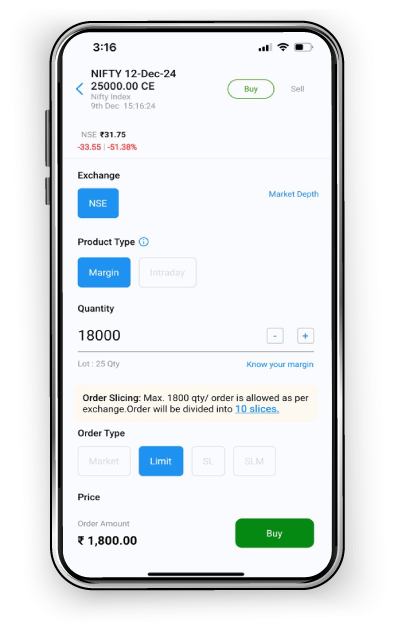
A text box on the order placement screen informs you how many slices will be created for your specified quantity. This provides transparency and keeps you in control of your trade.
How to Use the Order Slicer in the InvestRight App?
1.Navigate to Order pad of a contract and enter the desired quantity:
Disclaimer: Stocks/instruments mentioned in the image are for illustration purpose only.
This is not a recommendation to buy/sell. This is for your information and educational purpose.
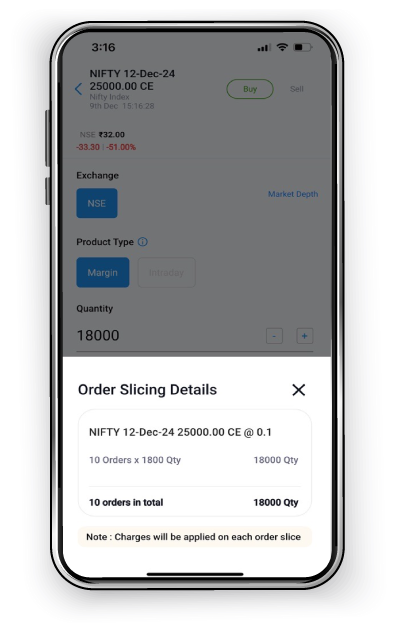
2.Click on the Order Slicing number in text box to get more info. Confirm and place your order. The backend will handle the rest, ensuring all slices are executed efficiently:
Disclaimer: Stocks/instruments mentioned in the image are for illustration purpose only.
This is not a recommendation to buy/sell. This is for your information and educational purpose.
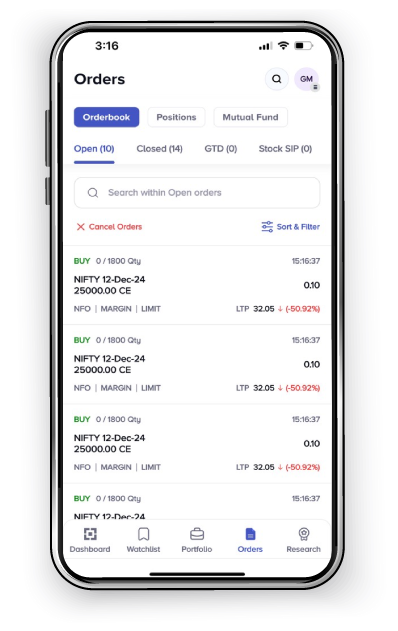
3.Check separate orders slice wise in Orderbook:
Disclaimer: Stocks/instruments mentioned in the image are for illustration purpose only.
This is not a recommendation to buy/sell. This is for your information and educational purpose.
Why Use the Order Slicer?
The Order Slicer is not just a feature; it’s a solution designed to make F&O trading more efficient and hassle-free. Here’s why you should leverage it:
Simplified Trading: No need to calculate and manually divide your orders.
Transparency: Clear visibility on the slicing mechanism before execution.
Seamless Experience: Place your desired quantity in a single step.
Minimized Risks: Avoid slippage and execute trades faster.
The Order Slicer feature in the InvestRight App empowers traders by removing complexities in large-order execution. Experience the difference with the Order Slicer—because in trading, every second counts, and every price point matters.
Related Posts
Don't miss another Article
Subscribe to our blog for free and get regular updates right into your inbox.
Categories




Subscribe for our
newsletter
newsletter
